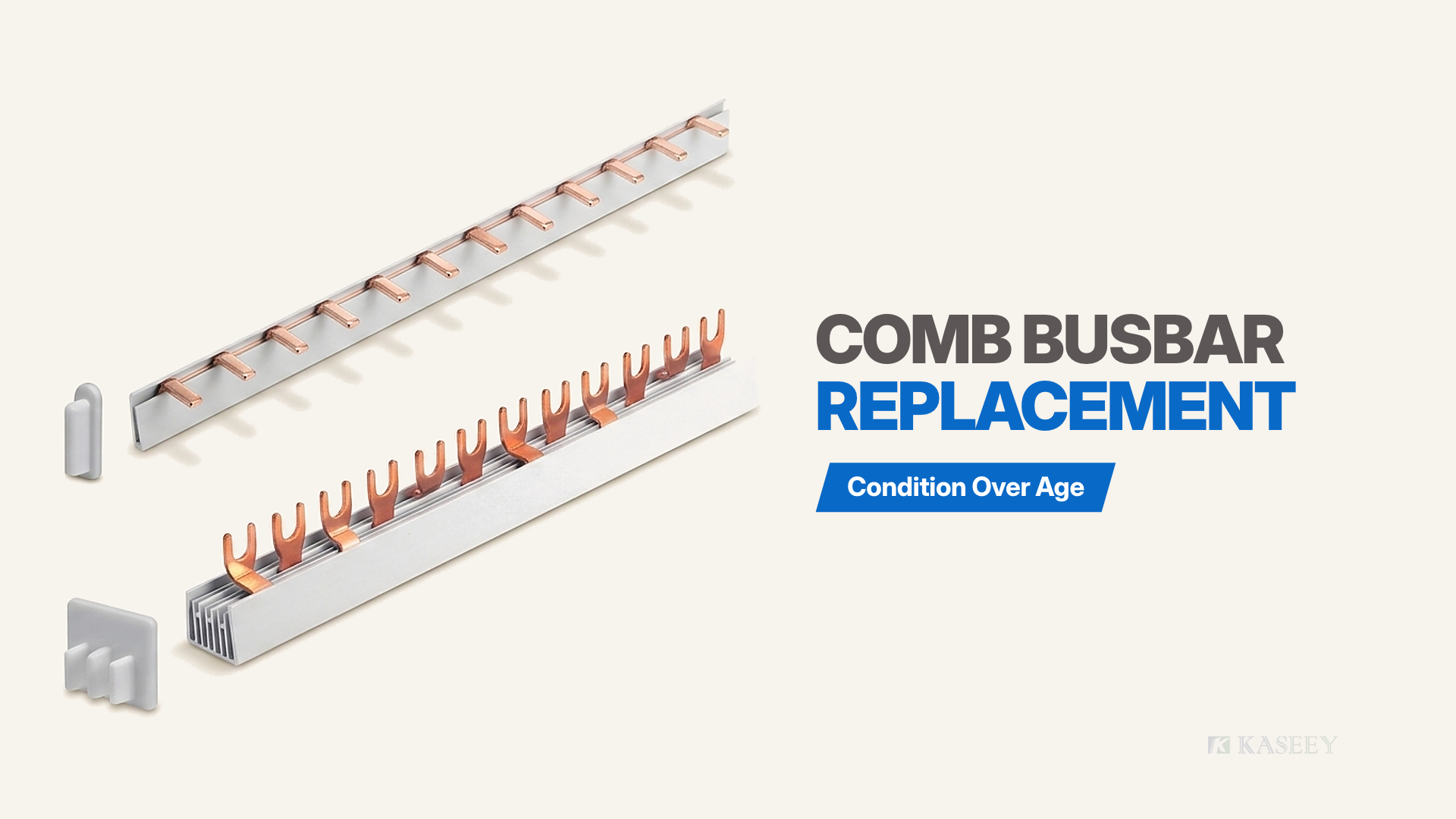
KASEEY publishes no fixed calendar service life for comb busbars; comb busbar replacement is decided strictly by physical condition rather than age. A long-serving bar whose insulation remains intact and whose teeth grip firmly stays in service, while a newer bar with heat-yellowed or brittle insulation comes out. During a de-energized visual inspection, six physical signs end a bar’s service life: insulation discoloration near the teeth, insulation embrittlement or cracking, bent teeth or lost clamping grip, contact oxidation or corrosion, adjacent heat marks, and cracked or missing end caps paired with bar damage. Checking unused bars upon delivery is a separate receiving step covered in the comb busbar incoming inspection checklist.
Why There Is No Service-Life Number
Comb busbar manufacturers publish dimensional, cross-section, and electrical ratings rather than a calendar replacement interval because calendar time does not wear out a stationary copper-and-polymer assembly—operating stress and mechanical handling do. Judging an installed comb busbar by physical condition rather than installation date prevents both premature strip-outs and overlooked thermal hazards.
Inside distribution boards and control cabinets, two identical comb busbars placed into service on the same day age along completely different paths depending on four panel-specific variables:
- Enclosure ambient heat and airflow: A comb busbar mounted in a ventilated indoor board sits in mild air, whereas an identical bar inside a densely packed cabinet near heat-generating power equipment operates in persistently warm air that ages polymer insulation faster.
- Sustained load duty and thermal cycling: Lightly loaded rows subject copper teeth and insulation sleeves to minimal thermal movement. Heavily loaded or frequently cycling rows expand and contract repeatedly at every terminal interface, testing contact stability over time.
- Atmospheric moisture and airborne contaminants: Clean, dry switchrooms preserve bright copper and tin-plated surfaces, while damp plant rooms, coastal air, or corrosive industrial vapors accelerate surface tarnish and corrosion at exposed contact zones.
- Frequency of removal and refitting: A bar installed once at panel build and left undisturbed keeps factory tooth straightness. A bar pried out and refitted repeatedly during circuit changes or device swaps accumulates mechanical bending stress at individual pin or fork teeth.
Because none of those operating histories can be read from an installation date label, physical condition—never age—is the sole replacement rule. An older comb busbar whose insulation sleeve retains uniform color and resilience, whose teeth remain straight and bright, and whose end caps sit intact requires no replacement. Conversely, a recently installed comb busbar that already shows browned insulation near a tooth opening or splayed fork prongs has exhausted its safe service life and must come out.
The Six Condition Signs
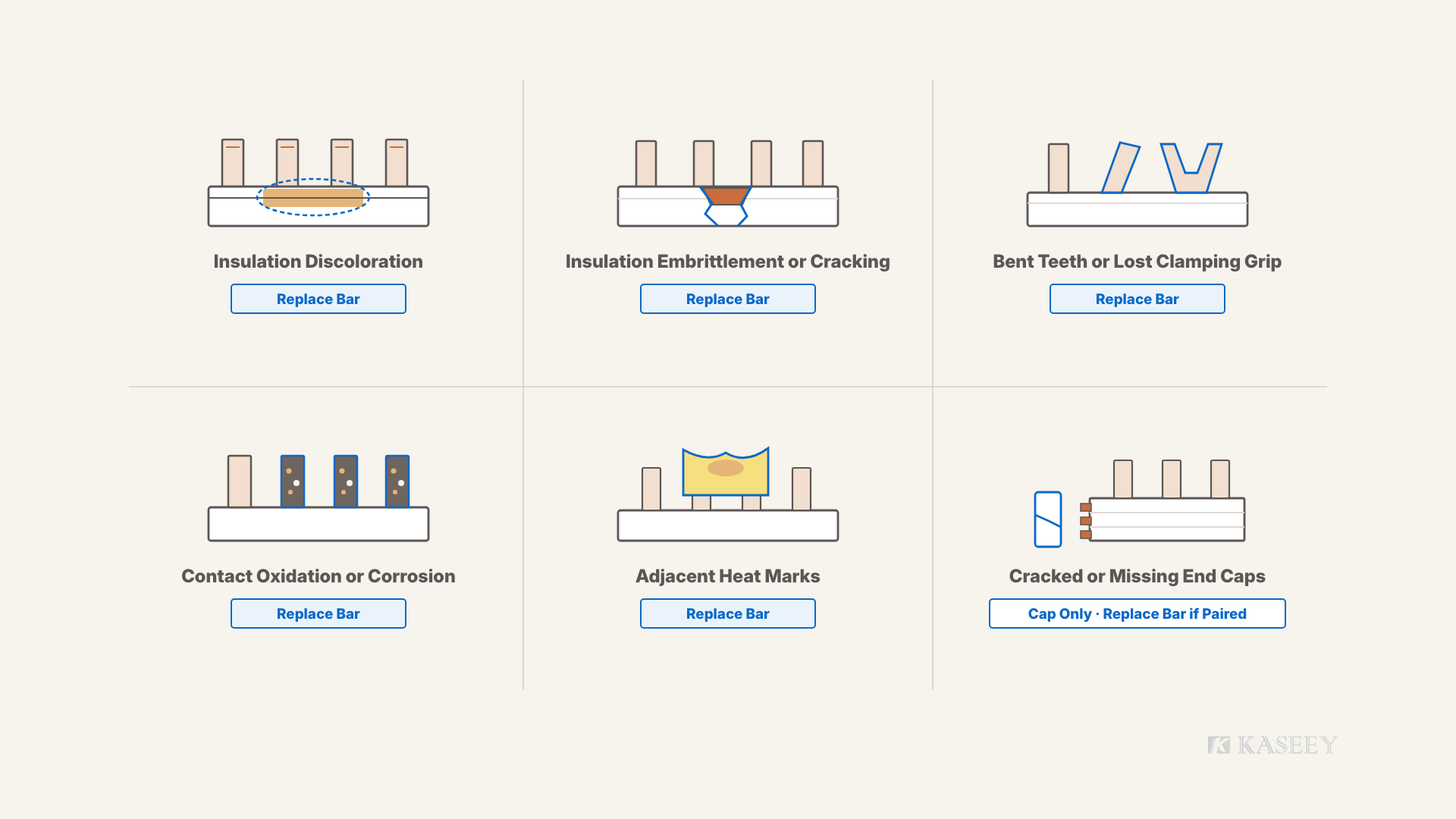
De-energized visual inspection of an installed comb busbar checks six physical signs across insulation, contact teeth, adjacent plastics, and end caps. Any single sign among the first five condemns the bar; a hot spot identified during routine in-service inspection by a qualified electrician likewise counts as a retirement sign, while live diagnostics fall outside this guide.
Insulation Discoloration Near the Tooth Openings
Localized yellowing, tanning, or browning of the insulating sleeve around comb busbar tooth openings indicates that the bar section has experienced sustained elevated heat in service. Compare the insulation immediately surrounding active teeth against unheated sections along lightly loaded ways or the clean back face of the housing.
When polymer insulation shifts from factory white or ivory toward yellow or brown near one or more teeth, heat from a resistive joint or overloaded path has baked the sleeve. Even when the isolated panel feels cool, that color shift is irreversible: heat-aged polymer has lost dielectric and mechanical margin. Plan comb busbar replacement whenever tooth-zone discoloration is present.
Insulation Embrittlement or Cracking
Comb busbar insulation that feels hard and chalky, cracks when gently handled, or shows visible splits exposing internal copper has lost electrical insulation integrity and no longer qualifies for service. Intact housings must maintain continuous touch protection and phase-to-phase separation along the full bar.
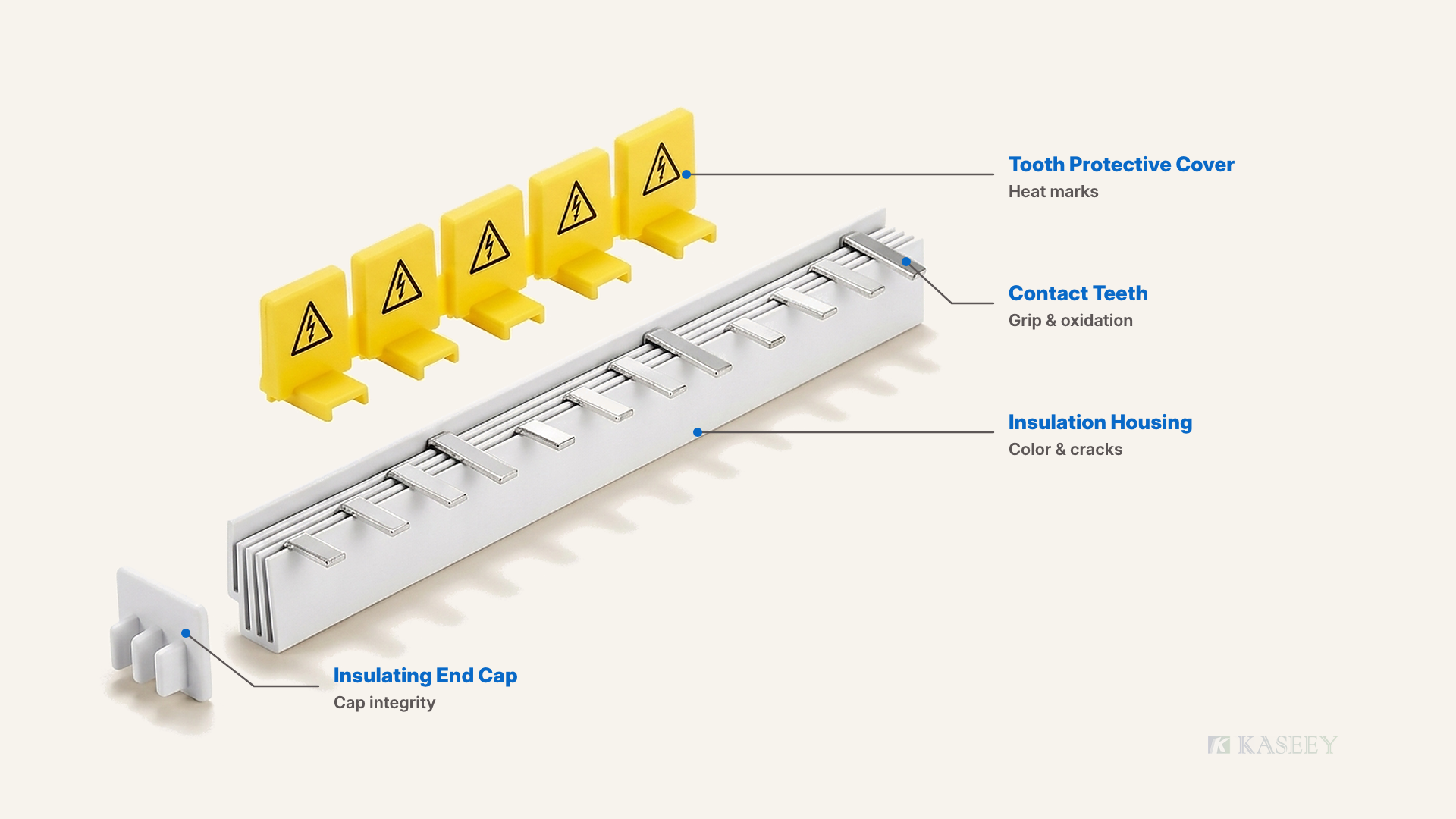
Inspect folded edges of single-phase U-channels, internal partition ribs of multi-phase housings, and narrow polymer bridges between tooth cutouts. Hairline splits, chipped phase barriers, stiffened resin that fractures under slight flex, or any opening exposing bare conductor metal means the sleeve no longer guarantees touch safety or phase isolation. Never tape over cracked insulation; retire the bar.
Bent Teeth or Lost Clamping Grip
Pin teeth bent out of plane by repeated removal and refitting, or fork prongs splayed open so the tooth sits loosely in its terminal or slips out under a light tug, turn that connection into a future heat source. Low-resistance current transfer depends on straight tooth entry and firm mechanical clamping at every way.
When crews lever a comb busbar out unevenly or force it back during device swaps, pins twist or bow and U-shaped forks spread wider than their original slot profile. Any visible bend—or looseness noticed while checking the isolated row—reduces metal-to-metal contact area inside the clamp, raising local resistance and generating heat under load. Do not pliers-straighten fatigued teeth; replace the bar.
Contact Surface Oxidation or Corrosion
Comb busbar tooth contact faces that appear dull dark brown, blackened, pitted, or coated with corrosion deposits instead of clean metallic copper or intact tin plating indicate degraded contact surfaces that call for replacing the bar. Clean metallic faces are required for low-resistance current transfer into device terminals.
Check visible tooth roots along the isolated row or inspect exposed pins and forks when a bar is removed during a planned outage. Heavy blackening often accompanies past localized heating, while powdery or pitted corrosion signals moisture or aggressive cabinet vapors. Because oxide and corrosion films create a resistive barrier inside the clamp, retire the oxidized bar and correct moisture ingress during the same shutdown.
Adjacent Heat Marks on Covers or Neighboring Housings
Melting, softening, warping, or heat staining on snap-on tooth protective covers or on modular device housings immediately adjacent to the comb busbar confirms that a hot spot has already occurred along the row. Neighboring thermoplastics frequently record localized overheating clearly before the entire busbar sleeve shows widespread damage.
Inspect yellow tooth protective covers over spare teeth and the terminal-entry moldings of every device connected to the bar. Deformed cover tabs, blistered plastic around terminal jaws, or heat-darkened device walls prove that interface heat exceeded safe limits. Because the busbar tooth sharing that joint underwent the same thermal event, replace the comb busbar alongside any heat-marked covers or devices.
Cracked or Missing Insulating End Caps
A cracked, loose, or missing insulating end cap leaves the copper conductor end exposed at the end of the comb busbar row, removing essential touch protection inside the enclosure. Whether that finding condemns the whole bar or only the cap depends on the rest of the inspection.
Examine both ends of every single-phase and multi-phase comb busbar while the board is isolated. Apply a clear two-part rule:
- End-cap defect alone: When an end cap is cracked or missing and the bar exhibits none of the five signs above—insulation remains uniform and uncracked, teeth stay straight and clean, and adjacent plastics show zero heat marks—keep the bar and fit a matching cap selected via how to select busbar end caps.
- Accompanied by any bar defect: When a cracked or missing end cap appears alongside discolored insulation, cracked housing walls, bent teeth, corroded contacts, or adjacent heat marks, retire and replace the entire comb busbar assembly.
| Condition Sign (De-Energized Visual) | What You Observe | What the Sign Means | Action Rule |
|---|---|---|---|
| Insulation discoloration | Yellowed or browned sleeve near tooth openings | Sustained overheating history on that section | Replace the entire comb busbar |
| Insulation embrittlement or cracking | Hardened polymer, splits on flex, or exposed copper | Lost dielectric barrier and touch protection | Replace the entire comb busbar |
| Bent teeth or lost clamping grip | Bowed pins, splayed forks, loose fit or pull-out | Low contact pressure creating a future heat source | Replace the entire comb busbar |
| Contact oxidation or corrosion | Darkened, blackened, or corroded tooth faces | Resistive surface film degrading contact | Replace the entire comb busbar |
| Adjacent heat marks | Melted, softened, or stained covers or device cases | Past hot-spot event along the busbar row | Replace the entire comb busbar |
| Cracked or missing end caps | Split or absent cap leaving bar end bare | Exposed conductor end without end insulation | Fit cap alone if bar is sound; replace bar if paired above |
Retire the comb busbar whenever any of the first five thermal, insulation, mechanical, or corrosion signs is present; replace the end cap alone only when a damaged or missing cap is the sole defect on an otherwise sound bar.
What Does Not Condemn a Bar
Accurate field inspection also separates harmless cosmetic wear from genuine retirement signs so maintenance teams avoid unnecessary comb busbar replacement and wasted outage time. Three observations—when each appears alone without any of the six condition signs—do not condemn a bar:
- Loose dry surface dust: Ordinary cabinet dust resting on the outer sleeve does not impair conductivity or insulation safety when accompanied by zero heat staining, zero moisture tracking, and clean contact teeth.
- Minor superficial scratches away from tooth openings: Shallow handling scuffs on the outer plastic face—well clear of tooth roots, phase partitions, and bar ends, with full wall integrity and no exposed conductor—leave the bar serviceable.
- Long time in service alone: An older comb busbar whose de-energized visual check confirms uniform sleeve color, resilient uncracked insulation, straight bright teeth, unmarked covers, and intact end caps remains fit for continued use.
After the Decision: Specifying the Replacement
Once de-energized visual inspection condemns an installed comb busbar, specifying the replacement bar accurately prevents a planned panel shutdown from stalling over mismatched parts on site. Verify three dimensional and electrical anchors before submitting a purchase order or pulling stock from stores:
- State module count and finished millimetre length as a published pair: Never order by measured millimetres alone or module count alone; quote the exact Article No. or state module count and finished length together from the target family’s table as detailed in comb busbar length and module count.
- Confirm device tooth pitch first: Verify modular row spacing before ordering so every tooth aligns cleanly across the rail—follow the check in the MCB busbar pitch guide.
- Review full selection parameters if original markings are missing: When phase arrangement, pin-versus-fork contact geometry, or cross-section is uncertain, step through how to select an MCB busbar.
Once those parameters are verified, match the required series and accessories in the KASEEY comb busbars range.
Frequently Asked Questions
How long does a comb busbar last?
KASEEY publishes no fixed service-life number for comb busbars because service conditions—ambient cabinet heat, load duty, moisture, and removal frequency—vary widely across installations. Replacement is governed strictly by physical condition rather than age: evaluate the isolated bar against the six de-energized visual signs above.
The insulation on my comb busbar has turned yellow. Can I keep using it?
Yellowed or browned insulation—particularly around the tooth openings—is a visual record of sustained overheating rather than benign aging. Because heat-aged insulation has already lost thermal and dielectric margin and cannot be given a safe remaining period, schedule comb busbar replacement instead of keeping the bar in service.
Can I replace just the damaged part of a comb busbar?
No. Comb busbars are one-piece insulated conductor assemblies with no field splicing or partial-segment repair method, so damage on any section requires replacing the whole bar. When specifying a replacement bar of a particular row size, quote module count and finished millimetre length together from the target series table.
Does removing and refitting a comb busbar damage it?
Careful removal does not automatically ruin a bar, but repeated prying and reinsertion can bend pin teeth, spread fork prongs, and reduce terminal clamping force. Inspect tooth straightness and seating grip while de-energized after every refit, and retire the bar if any tooth is bent or loose.
Who should inspect a comb busbar in service?
De-energized visual inspection inside an isolated distribution board should be performed by a competent person trained in safe panel isolation and access. Any investigation beyond de-energized visual checks—such as diagnosing suspected in-service hot spots or electrical faults—belongs to a qualified electrician; live diagnostic work is outside this guide’s scope.
Swapping out a condemned comb busbar is quick work; ordering the wrong module-and-length pair, pitch, or phase layout is the common mistake—double-check every item in After the Decision: Specifying the Replacement before sending the order.
Sources
- Busbars — KASEEY (Yueqing Kaseey Electric Co., Ltd.). Published pin-type, fork-type, and multi-phase comb busbar product range and insulated copper construction.
- Busbar End Caps and Busbar Protective Cover — KASEEY (Yueqing Kaseey Electric Co., Ltd.). Published insulating end-cap and snap-on spare-tooth cover product specifications.